
Class 11 Practical Programs
String Module Operations Menu
AIM
To write a menu-driven program to perform various operations using the string module in Python, including displaying ASCII letters, digits, hexadecimal digits, octal digits, punctuation, and converting strings to title case.
ALGORITHM
- Start
- Import the string module
- Initialize choice variable to 0
- Start a while loop that continues until choice is 7
- Display the menu with 7 options
- Take user's choice as input
- Use if-elif-else statements to handle each choice:
- Choice 1: Display ASCII letters using string.ascii_letters
- Choice 2: Display digits using string.digits
- Choice 3: Display hexadecimal digits using string.hexdigits
- Choice 4: Display octal digits using string.octdigits
- Choice 5: Display punctuation using string.punctuation
- Choice 6: Take string input and display in title case using string.capwords()
- Choice 7: Break the loop to exit
- Repeat until user chooses to exit
- Stop
PROGRAM
# Menu-driven program to perform string module operations

import string

ch = 0
while ch != 7:
    print('''
            1. Display the ascii letters
            2. Display the digits
            3. Display Hexadedigits
            4. Display Octaldigits
            5. Display Punctuation
            6. Display string in title case
            7. Exit
            ''')

    ch = int(input("Enter your choice:"))

    if ch == 1:
        print(string.ascii_letters)
    elif ch == 2:
        print(string.digits)
    elif ch == 3:
        print(string.hexdigits)
    elif ch == 4:
        print(string.octdigits)
    elif ch == 5:
        print(string.punctuation)
    elif ch == 6:
        s = input("Enter sentence:")
        print(string.capwords(s))
    elif ch == 7:
        break
    else:
        print("Invalid Choice")
OUTPUT
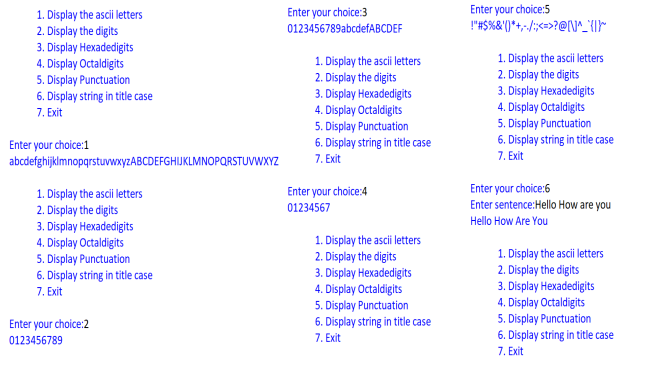
The above image shows the complete execution of the program with different menu choices demonstrating all string module operations.
STRING MODULE CONSTANTS
| Constant | Description | Value |
|---|---|---|
| string.ascii_letters | All ASCII letters (lowercase + uppercase) | abcdefghijklmnopqrstuvwxyzABCDEFGHIJKLMNOPQRSTUVWXYZ |
| string.digits | All decimal digits | 0123456789 |
| string.hexdigits | All hexadecimal digits | 0123456789abcdefABCDEF |
| string.octdigits | All octal digits | 01234567 |
| string.punctuation | All punctuation characters | !"#$%&'()*+,-./:;<=>?@[\]^_`{|}~ |
ALTERNATIVE METHODS
Method 2: Using Functions
import string

def display_ascii_letters():
    print("ASCII Letters:", string.ascii_letters)

def display_digits():
    print("Digits:", string.digits)

def display_hexdigits():
    print("Hexadecimal Digits:", string.hexdigits)

def display_octdigits():
    print("Octal Digits:", string.octdigits)

def display_punctuation():
    print("Punctuation:", string.punctuation)

def display_title_case():
    s = input("Enter sentence: ")
    print("Title Case:", string.capwords(s))

def main():
    functions = {
        1: display_ascii_letters,
        2: display_digits,
        3: display_hexdigits,
        4: display_octdigits,
        5: display_punctuation,
        6: display_title_case
    }

    while True:
        print('''
        1. Display ASCII letters
        2. Display digits
        3. Display Hexadecimal digits
        4. Display Octal digits
        5. Display Punctuation
        6. Display string in title case
        7. Exit
        ''')

        choice = int(input("Enter your choice: "))

        if choice == 7:
            break
        elif choice in functions:
            functions[choice]()
        else:
            print("Invalid choice!")

if __name__ == "__main__":
    main()
Method 3: Using Class-Based Approach
import string

class StringOperations:
    def __init__(self):
        self.menu_options = {
            1: ("Display ASCII letters", self.show_ascii_letters),
            2: ("Display digits", self.show_digits),
            3: ("Display Hexadecimal digits", self.show_hexdigits),
            4: ("Display Octal digits", self.show_octdigits),
            5: ("Display Punctuation", self.show_punctuation),
            6: ("Display string in title case", self.show_title_case),
            7: ("Exit", None)
        }

    def show_menu(self):
        print("\n" + "="*40)
        print("STRING MODULE OPERATIONS MENU")
        print("="*40)
        for key, (description, _) in self.menu_options.items():
            print(f"{key}. {description}")
        print("="*40)

    def show_ascii_letters(self):
        print(f"ASCII Letters: {string.ascii_letters}")

    def show_digits(self):
        print(f"Digits: {string.digits}")

    def show_hexdigits(self):
        print(f"Hexadecimal Digits: {string.hexdigits}")

    def show_octdigits(self):
        print(f"Octal Digits: {string.octdigits}")

    def show_punctuation(self):
        print(f"Punctuation: {string.punctuation}")

    def show_title_case(self):
        sentence = input("Enter sentence: ")
        print(f"Title Case: {string.capwords(sentence)}")

    def run(self):
        while True:
            self.show_menu()
            try:
                choice = int(input("Enter your choice: "))
                if choice == 7:
                    print("Thank you for using String Operations!")
                    break
                elif choice in self.menu_options:
                    _, function = self.menu_options[choice]
                    if function:
                        function()
                else:
                    print("Invalid choice! Please try again.")
            except ValueError:
                print("Please enter a valid number!")

# Usage
if __name__ == "__main__":
    app = StringOperations()
    app.run()
CONCLUSION
Thus, the given program was successfully executed and the output was verified as per the expected result.
VIVA QUESTIONS
What is the purpose of the string module in Python?
The string module provides various constants and functions for string operations. It contains predefined constants like ascii_letters, digits, punctuation, etc., and functions like capwords() for text manipulation.
What is the difference between string.ascii_letters and string.ascii_lowercase?
string.ascii_letters contains both lowercase and uppercase letters (a-z and A-Z), while string.ascii_lowercase contains only lowercase letters (a-z).
How does string.capwords() differ from the title() method?
string.capwords() capitalizes the first letter of each word and removes extra whitespace, while title() capitalizes the first letter after any whitespace or punctuation but preserves the original spacing.
What characters are included in string.punctuation?
string.punctuation includes all ASCII punctuation characters: !"#$%&'()*+,-./:;<=>?@[\]^_`{|}~
How would you modify this program to handle invalid menu choices more gracefully?
Add try-except blocks to handle ValueError for non-integer inputs, provide clear error messages, and use input validation to ensure choices are within the valid range (1-7).
What is the advantage of using hexadecimal and octal digit constants?
These constants are useful for validating input in different number systems, converting between bases, and working with low-level programming where different number representations are common.
How can you extend this program to include custom string operations?
Add new menu options with corresponding elif conditions, create functions for complex operations like palindrome checking, string reversal, or character frequency counting.
What are the limitations of using a simple while loop for menu-driven programs?
Simple while loops don't handle exceptions well, can become complex with many options, and don't provide easy extensibility. Using functions or classes provides better organization and error handling.
Related Resources
- Python Fundamentals
- Python Input/Output Tutorial
- Python Basics PDF
- Python Fundamentals MCQs
- Next Program: Number Comparison
Need Help?
Join our tuition classes for personalized guidance and doubt clearing sessions.
Register for Classes →